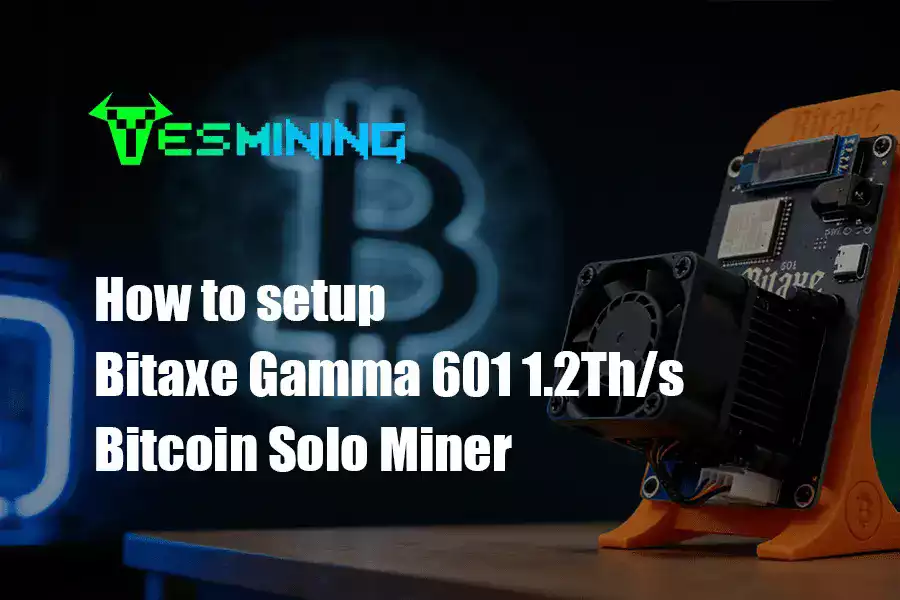
1. Introduction to Bitcoin Solo Mining with the Bitaxe Gamma 601
For cryptocurrency enthusiasts and DIY hobbyists, the allure of mining Bitcoin independently—known as solo mining—is a powerful draw. It represents a direct, hands-on connection to the blockchain network. The Bitaxe Gamma 601 has emerged as a unique device that makes this experiment more accessible than ever before. Unlike industrial-scale ASIC miners that are loud, power-hungry, and complex, the Gamma 601 is designed for quiet home use, low power consumption, and a community-driven, open-source ethos.
This guide provides a trustworthy, detailed walkthrough that covers everything from unboxing to advanced tuning, all while giving you a realistic picture of what solo mining with a 1.2 TH/s device truly entails in today’s competitive landscape.
Before you start, it’s crucial to understand what you’re working with. The Gamma 601 is a compact, efficiently engineered device built around a single powerful ASIC chip. You can check the latest stock, pricing, and bundle details on the official product page at Yesmining.io.
Core Technical Specifications:
Feature
Specification
Note / Source
Hash Rate
1.2 TH/s (Tera Hashes per second)
Default; tunable.
Power Consumption
18W – 38W
Varies based on configuration.
ASIC Chip
BM1370
The same chip used in Antminer S21 series, known for high efficiency.
Cooling
40mm Dual Ball-Bearing Smart Fan
Runs quietly; activates based on temperature.
Network Connectivity
Built-in 2.4 GHz Wi-Fi & Hotspot Mode
Enables wireless setup and management.
Interface
Web Browser via IP Address
Typically `192.168.4.1` when connected to its hotspot.
Power Supply
5V/6A Adapter (Included)
Global voltage standard (100-240V).
Firmware
Open-Source (Bitaxe OS)
Allows for community development and customization.
What You Should Receive:
• Bitaxe Gamma 601 Miner Unit • 5V/6A Power Adapter • AC Power Cable • Stand/Holder (for vertical placement) • Instruction Manual (basic)
3. Step-by-Step Setup Guide
Follow these steps carefully for a smooth first-time setup.
Phase 1: Hardware Connection & First Boot
1. Placement: Choose a well-ventilated, cool, and dry location. The included stand allows for vertical placement to aid airflow. 2. Power Connection: Connect the included power adapter to the miner’s DC port, then plug it into a wall outlet. Do not use a weak or overloaded multi-plug strip; a stable power source is critical. 3. Power On: The device will boot up. You should see the startup screen on the small OLED display.
Phase 2: Connecting to the Miner’s Interface
1. On your computer or smartphone, go to Wi-Fi settings and look for a new network named something like `Bitaxe_XXXX`. 2. Connect to this Wi-Fi hotspot. No password is typically required for this initial setup network. 3. Open a web browser (Chrome, Firefox, etc.) and navigate to the configuration address: `http://192.168.4.1`. The Bitaxe dashboard should load.
Phase 3: Connecting to Your Home Network
1. In the dashboard, navigate to the Network settings. 2. Enter your home 2.4 GHz Wi-Fi network name (SSID) and password. The Gamma 601 does not support 5 GHz bands. 3. Save and restart. The miner will now connect to your local network. You may need to check your router’s client list to find its new IP address to access the dashboard in the future.
Phase 4: Crucial Solo Mining Configuration
This is the most important step. For solo mining, you are not joining a shared pool but attempting to find a block on your own.
1. In the dashboard, find the Miner Configuration or Pool Setup section. 2. For solo mining, you need to point your miner to a solo mining server or construct. A common public option for testing is `public-pool.io` on port `21496`. 3. In the “Address” field, you would enter: `public-pool.io:21496`. 4. The “Worker” or “Username” field must contain your Bitcoin address. This is where the block reward will be sent if you miraculously find one. Double-check this address; any error means lost rewards. 5. Save the configuration. Your miner will now start working on solving blocks for the Bitcoin network independently.
⚠️ Critical Note on Solo Mining Realities: With the current Bitcoin network hash rate exceeding 400 EH/s, a 1.2 TH/s miner has an astronomically low probability of ever finding a block alone. This setup is primarily for educational purposes and the pure experiment of solo mining. Do not expect financial returns from this mode.
4. Advanced Configuration & Performance Tuning
Once operational, you can fine-tune the Gamma 601. Proceed with caution, as incorrect settings can cause instability.
• Hash Rate & Voltage Tuning: In the advanced settings, you can adjust the core frequency (400-625 MHz) and core voltage (1000-1250 mV). Increasing these can push hash rate slightly above 1.2 TH/s but will increase power consumption and heat output. The default offers the best balance of efficiency and stability. • Fan Control: The smart fan usually manages itself, but you can set manual thresholds if desired for even quieter operation in cool environments. • Open-Source Community: The true power of the Bitaxe project lies in its open-source firmware. Platforms like GitHub host community-developed versions that can add features or optimizations. Flashing new firmware carries risk but is a great way to learn.
5. Monitoring, Maintenance & Troubleshooting
Regular Monitoring:
Use the web dashboard to monitor: • Hash Rate: Should be stable around 1.2 TH/s. • Temperature: Chip temperature is key. Ideal range is typically between 40°C and 70°C. • Hardware Errors: A low rate is normal; a skyrocketing error rate indicates an unstable overclock or cooling issue.
Essential Maintenance:
• Dust Cleaning: Every few months, use compressed air to gently clean the fan and heatsinks to prevent overheating. • Connection Check: Periodically ensure all cables are secure.
Common Troubleshooting:
Problem
Likely Cause
Solution
Cannot access `192.168.4.1`
Not connected to miner’s Wi-Fi; IP conflict.
Reconnect to `Bitaxe_XXXX` network; try restarting miner.
Hash rate is 0 or unstable
Incorrect pool setup; network issues.
Verify solo mining address and Bitcoin wallet in config. Restart.
Miner is overheating
Poor ventilation; dust clogged; fan failure.
Move to cooler location, clean dust, check if fan spins on boot.
High hardware error rate
Unstable overclock/undervolt settings.
Reset frequency and voltage to default (safe) values.
6. Realistic Profitability & Important Considerations
Solo Mining:
As stated, the chance of finding a block solo is effectively zero. Do not purchase this device as a revenue-generating investment.
Pooled Mining:
If configured for a pool (a more realistic setup), you would share rewards with others. Even then, with a hypothetical 1.2 TH/s, electricity cost at $0.14/kWh, and current Bitcoin price/difficulty, daily earnings would be a few cents at best. An analysis suggested a payback period of around 11 months in a pooled scenario under ideal conditions, which is highly variable.
Key Considerations:
– Electricity Cost: This is your biggest variable. Mine only if you have very cheap power, otherwise this is a net-loss hobby. – Legal & Regulatory: Always check your local regulations regarding cryptocurrency mining and taxation. – Noise: While quiet (≈68dB like a fridge), it’s not silent—consider this for living spaces.
7. Conclusion & Final Recommendations
The Bitaxe Gamma 601 is not a get-rich-quick machine. It is, however, a fascinating, well-engineered tool for hands-on learning. It demystifies Bitcoin mining, offering a quiet, low-power window into the world of ASICs and blockchain participation.
7. Conclusion & Final Recommendations
1. Buy for the Right Reason: Purchase it as an educational hobby kit, a cool tech display piece, or to support open-source hardware. 2. Follow the Guide: Use this step-by-step setup to get running smoothly. 3. Join the Community: Engage with the open-source Bitaxe community for support, custom firmware, and to share your experiences. 4. Manage Expectations: Understand the financial and probabilistic realities of solo mining with a device of this scale.
By approaching the Bitaxe Gamma 601 with curiosity and realistic expectations, you can enjoy a unique and insightful journey into the heart of Bitcoin technology. If you are ready to start your mining experiment, you can begin by purchasing the Bitaxe Gamma 601 from Yesmining.io.

 English
  Russian
  Spanish
  French
  German



















 Bitdeer
 Bitmain
 BOMBAX
 DragonBall
 Elphapex
 Fluminer
 Goldshell
 iBelink
 Iceriver
 Ipollo
 Jasminer
 Volcminer
 Aleo Miner
 Bitcoin(BTC) Miner
 CKB Miner

 ETC Miner


 Kaspa(KAS) Miner


 Siacoin(SC) Miner