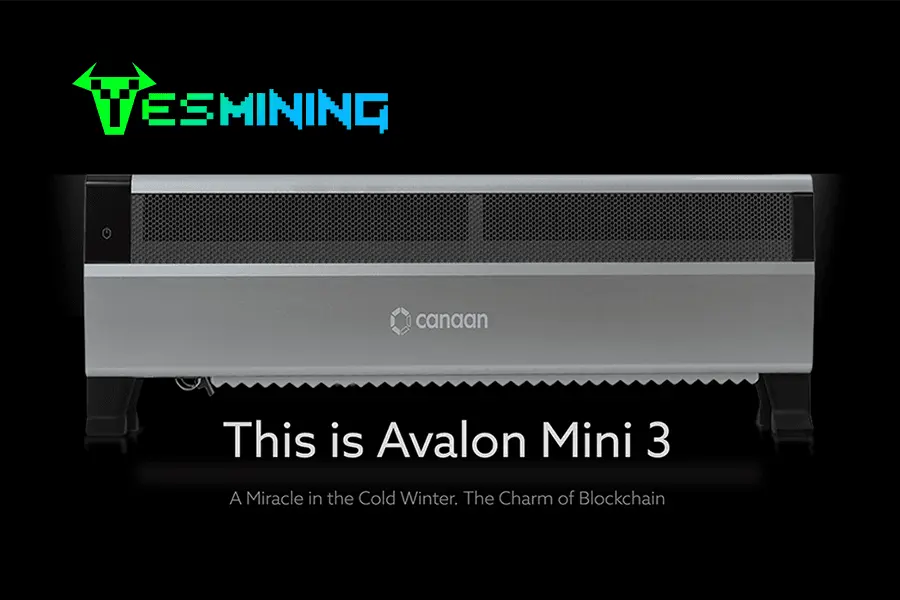
The landscape of Bitcoin mining hardware has shifted. While industrial-scale farms dominate the headlines, the Avalon Mini 3 37.5T by Canaan has emerged as the definitive “Prosumer” choice. It strikes an incredible balance between the raw power of professional ASIC miners and the spatial/acoustic requirements of a home environment.
In this technical guide, the YesMining engineering team walks you through every detail of setting up your 37.5T unit, optimizing its 800W power profile, and ensuring your device maintains peak efficiency for years to come.
1. Understanding the Avalon Mini 3 Architecture
The Avalon Mini 3 is not just a standard miner; it is built on the advanced A14 architecture. Unlike its smaller sibling, the Nano 3S, the Mini 3 is designed for serious hobbyists who demand a significant hashrate—specifically 37.5 TH/s—while maintaining a form factor that fits on a sturdy shelf or desk.
| Technical Parameter | Detail |
|---|
| Hashrate Performance | 37.5 TH/s (-5% to +8%) |
| Power Consumption | 800W Max (Wall Power) |
| Power Efficiency | ~21.3 J/TH |
| Cooling System | Advanced High-RPM Dual Fan System |
| Chipset | Canaan Custom ASIC (A14 Series) |
To ensure you are getting an authentic unit with a full manufacturer warranty, we recommend purchasing the Canaan Avalon Mini 3 37.5T directly from YesMining.
2. Essential Hardware & Power Requirements
Setting up an 800W device requires more diligence than a standard laptop. Before unboxing, ensure your infrastructure meets these professional standards:
- Power Supply Unit (PSU): The Mini 3 typically comes with an integrated or matched PSU. Ensure your wall socket can handle a continuous 800W load. We recommend a dedicated 10A or 15A circuit.
- Voltage: While it is flexible, the Mini 3 performs best on 220V-240V circuits to maximize efficiency, though it is compatible with standard home voltages in most regions.
- Ethernet Connection: Unlike the Nano series which relies on Wi-Fi, the Mini 3 is built for stability. A high-quality Cat6 Ethernet cable is required for low-latency mining.
3. Physical Installation & Network Integration
- Placement: Place the unit on a flat, non-flammable surface. Ensure there is at least 20cm (8 inches) of clearance at both the front (intake) and back (exhaust) for optimal airflow.
- Cable Connection: Plug the Ethernet cable into the RJ45 port. Ensure it clicks firmly.
- Power Sequence: Connect the power cable to the miner first, then to the wall outlet. The fans will immediately spin at high speed for a “self-test” period of about 30-60 seconds.
Pro Tip: Use an IP Scanner (such as Advanced IP Scanner or Angry IP Scanner) to find the device on your local network. Look for a device labeled “Canaan” or “Avalon.”
4. Accessing the Dashboard & Miner Config
Once you have identified the Miner’s IP (e.g., 192.168.1.105), open your preferred browser and follow these steps:
Step 1: Login
The default credentials for the Avalon Mini 3 are typically:
Username: root
Password: (Leave blank or use ‘root’ depending on firmware version)
Step 2: Pool Configuration
Navigate to the “Miner Configuration” tab. You must enter three mining pool URLs for redundancy. We recommend reputable pools like SlushPool (Braiins), F2Pool, or AntPool.
- URL: stratum+tcp://btc.f2pool.com:3333
- Worker Name: YourUsername.Worker01
- Password: 123
Step 3: Save & Apply
Click “Save & Apply.” The miner will restart the mining software, which can take up to 5 minutes to reach the target hashrate of 37.5 TH/s.
5. Thermal Management & Noise Optimization
At 800W, the Avalon Mini 3 generates substantial heat. To protect your investment:
- Exhaust Ducting: Consider using a 4-inch or 6-inch ducting shroud to vent the hot air out of a window.
- Operational Modes: Check for “Low Power Mode” in the dashboard if you want to reduce noise during night hours. Note that this will reduce your TH/s output.
- Ambient Temperature: Keep the room temperature below 30°C (86°F). ASIC lifespan is inversely proportional to operating temperature.
6. Professional Troubleshooting
Drawing from our years of experience in ASIC maintenance, here are the three most common hurdles for the Mini 3:
1. “Socket Error” or Connection Drops
This is usually not a hardware fault. It indicates a failure to communicate with the mining pool. Check your DNS settings in the network tab and ensure your ISP is not blocking mining traffic (common in some residential areas).
2. Hashrate Fluctuations
It is normal for the hashrate to fluctuate ±5%. However, if it stays below 30 TH/s, check the “Log” section. Look for “Hot” warnings—this indicates the miner is thermal throttling and needs better ventilation.
3. PSU Fan Noise
If the PSU fan is louder than the intake fan, it may be dusty. Use compressed air (while the unit is OFF) to clean the vents once every 3 months to maintain the efficiency of the 800W power delivery system.
7. Conclusion & Where to Buy
The Avalon Mini 3 37.5T is a masterpiece of compact engineering. It provides enough power to be a significant player in the Bitcoin network while remaining accessible to the dedicated home user. Proper setup is the difference between a profitable machine and an expensive paperweight.
For more advanced setups, bulk orders, or professional mining advice, trust the experts who live and breathe hardware.
Disclaimer: Bitcoin mining involves financial risk. Hashrate and profitability are subject to network difficulty and market fluctuations. Always perform your own due diligence.

 English
  Russian
  Spanish
  French
  German






















 Bitdeer
 Bitmain
 BOMBAX
 DragonBall
 Elphapex
 Fluminer
 Goldshell
 iBelink
 Iceriver
 Ipollo
 Jasminer
 Volcminer
 Aleo Miner
 Bitcoin(BTC) Miner
 CKB Miner

 ETC Miner


 Kaspa(KAS) Miner


 Siacoin(SC) Miner