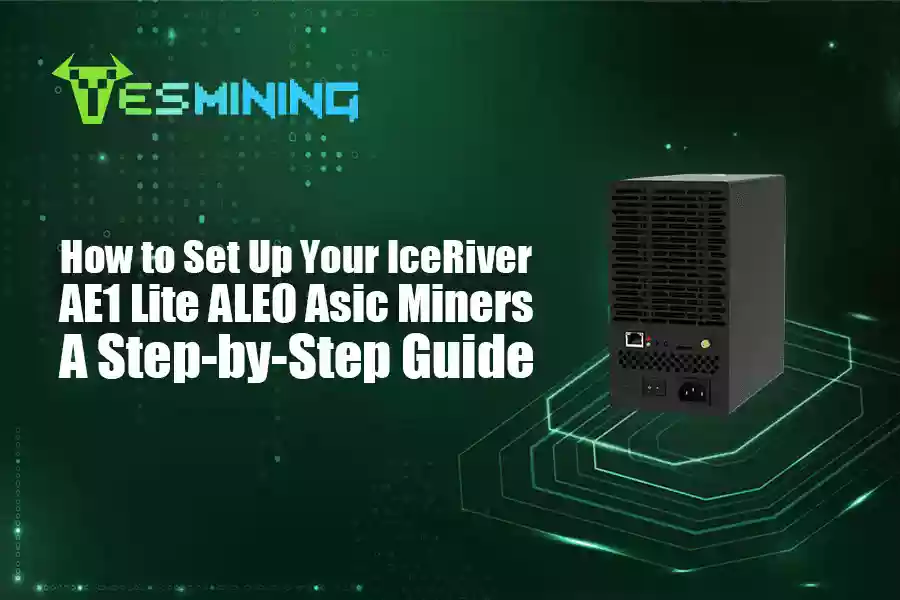
IceRiver AE1 Lite 300Mh/s mining hardware is officially released for cryptocurrency mining of ALEO. It providing a maximum hashrate of 300Mh/s with power consumption of 500W, and an ultra-quiet design for the zkSNARK algorithm of the Aleo project. In this article, we will introduce the complete ASIC miners setup and optimisation techniques to help you get started quickly!
Unpacking and Preparation
The IceRiver AE1 Lite miner configuration is designed with simplicity and portability in mind. Measuring only 205 × 110 × 202mm in size, with a net weight of 4.02kg, makes it a breeze to carry around, and says goodbye to the era of ‘asic miners = fitness equipment’! Its compact design also helps lower shipping costs—offering better value for everyday miners.
Before starting the ASIC miners setup, please make sure to complete the following preparations.
(1) Make sure you have all the accessories
IceRiver AE1 Lite (PSU included in all-in-one unit)
Power cable for your region (Included in the manufacturer’s original packaging)
Ethernet cable (For network connection)
(2) Environmental Requirements
Environmental conditions: Low dust, away from water sources
Thermal conditions: Ensure good ventilation, recommended ambient temperature below 35°C.
Network connection: Stable network and power supply
Installation Procedure
(1) Connect the power supply
Connect the power cable to the power connector of the asic mining hardware. The unit runs on 100–240V, standard household power. Daily power usage is approximately 12 kWh.
(2) Connect Network
Plug one end of the Ethernet cable into the cryptocurrency mining hardware’s network port, and connect the other end to a router or switch.
Suggestion: Use DHCP to reserve an IP address to avoid IP conflicts.
(3) Start the asic miner
Turn on the power and press the asic mining hardware’s power switch (AE1 Lite is located on the side).
Wait for the cryptocurrency asic miner to start (observe the status of the indicator light).
Software Configuration and Mining Pool Setting
Once your miner is powered on and connected to the network, it’s time to connect IceRiver AE1 Lite to F2Pool or your preferred Aleo mining pool. Let’s start.
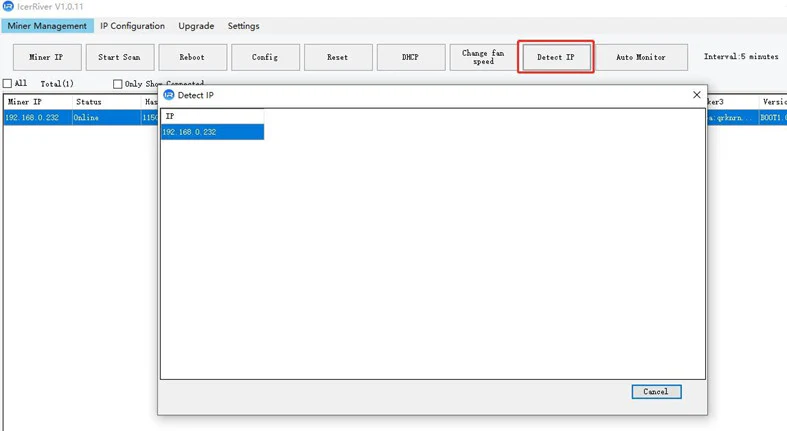
(1) Finding the IP Address of the Crypto Mining Machine
Log in to the DHCP management interface of your router, and find the device that has been assigned an IP address in the list of connected devices.
Or use official tools (e.g. IceRiver IP Reporter IP Reporter) to scan the IP address of the asic mining machine.
(2) Log in to the cryptocurrency mining machine management interface
Browser enter the IP address of the asic mining machine to enter the Web control panel (Default login username is Admin and password is 12345678).
(3) Configure the mining pool information
Find the ‘Miner Settings’ or ‘Pool Configuration’ page in the control panel.
Fill in the following information (Mining pool recommendations: F2Pool):
- URL: stratum+tcp://aleo.f2pool.com:4400
- Worker: your asic miner’s name (in the format of wallet address, asic miner number)
- Password: any character from your wallet.
- Multiple pools backup: you can add 2-3 pool addresses to ensure uninterrupted mining.
(4) Save and restart
Click ‘Save & Apply’ and wait for AE1 Lite to restart and start running.
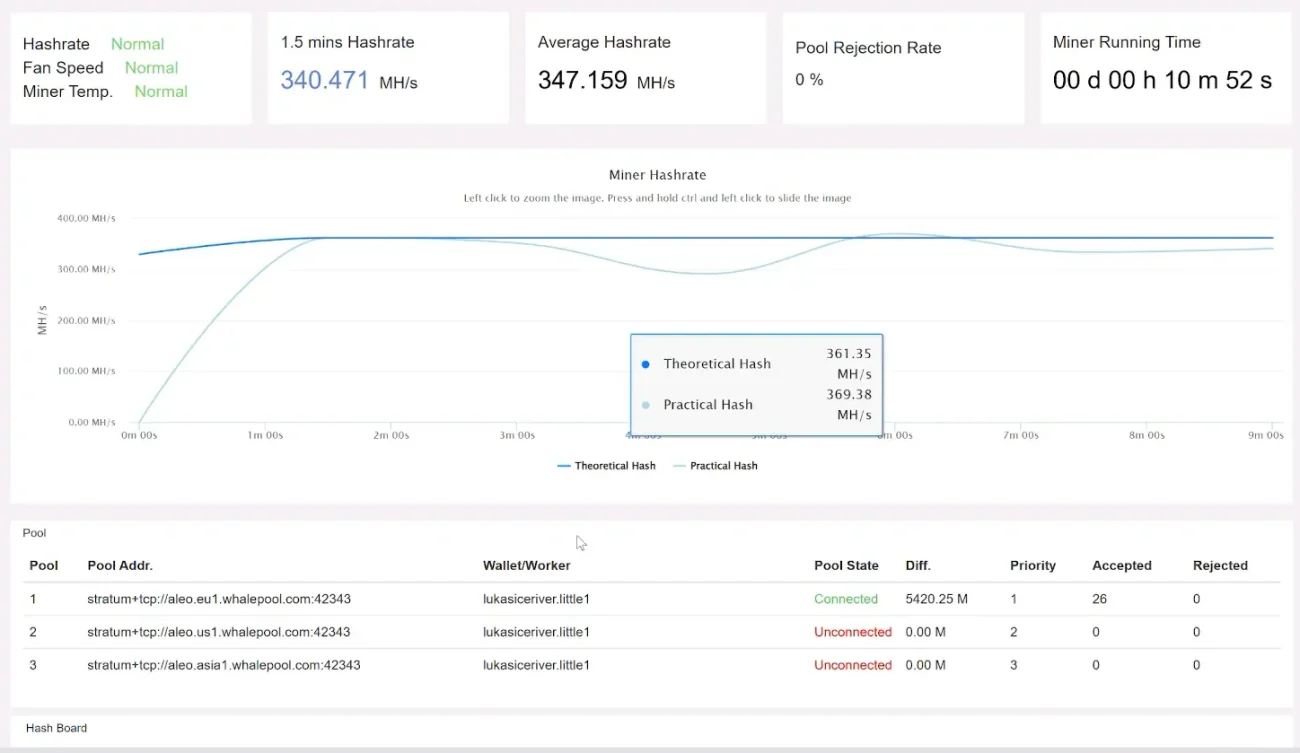
Return to the control panel to check the Hashrate status (it usually takes 5-10 minutes to sync the data), and you can see that your Iceriver AE1 Lite has connected to your preferred Aleo mining pool and started mining Aleo.
Monitoring and Optimisation Tips
(1) Real-time Monitoring Tools
Official Panel: View data such as arithmetic power, temperature, fan speed, etc. through the web interface.
Third-party tools: Use Hive OS, Awesome Miner, etc. to centrally manage multiple mining machines.
(2) Heat dissipation management
Regularly clean the dust net and fan to prevent dust accumulation.
(3) Problem Handling
If you have any problems setting up your crypto mining machine, you can always contact Yesmining!
FAQs
1. Is IceRiver ALEO AE1 Lite suitable for home mining?
Sure. As a leading brand in the crypto mining industry, IceRiver delivers exceptional performance with the AE1 Lite. Its compact design and low noise operation make it perfect for home mining.
2. How much does the AE1 Lite earn daily?
As of June 2025, the IceRiver AE1 Lite is estimated to earn $10.61 per day (excluding electricity costs). With an electricity rate of $0.10 per kWh, the expected daily profit is approximately $9.41.
3. How do I find my miner’s IP address?
Finding your miner’s IP is simple. For the easiest method, we recommend using the IceRiver IP Reporter tool – it automatically detects all IceRiver miners on your network.
Alternatively, you can check your router’s connected devices list or use the official IP Reporter tool to locate the miner’s IP quickly.

 English
  Russian
  Spanish
  French
  German

















 Avalon
 Bitdeer
 Bitmain
 BOMBAX
 DragonBall
 Elphapex
 Fluminer
 Goldshell
 iBelink
 Iceriver
 Ipollo
 Jasminer
 Volcminer
 Aleo Miner
 Bitcoin(BTC) Miner
 CKB Miner
 Dash Miner
 Doge<C Miner
 ETC Miner
 Grin Miner
 Handshake(HNS) Miner
 Initverse(INI) Miner
 Kadena(KDA) Miner
 Kaspa(KAS) Miner
 LBRY (LBC) Miner
 Monero(XMR) Miner
 Nexa Miner
 Ravencoin(RXD) Miners
 ScPrime(SCP) Miner
 Siacoin(SC) Miner