The highly anticipated Fluminer L1 has arrived, marking a significant step for home Bitcoin mining. Touted by crypto miners for its perfect balance of hash rate and energy efficiency, this next-generation miner makes solo and pool mining more accessible than ever.
So, you’ve got your hands on one—ready to turn it into your personal bitcoin-generating machine? This guide will walk you through the entire setup process, from unboxing to hashing.
Key Takeaways
Proper setup begins with using correct accessories and choosing a well-ventilated location to ensure stable operation and protect your hardware.
Set up your mining pool and wallet through the miner’s online dashboard.
Regular maintenance ensures your miner’s performance and lifespan.
Pick a good mining pool and update your pool settings. This helps you earn more and keeps your miner working without problems.
Profitability is Variable. Income fluctuates based on Bitcoin’s price, network difficulty, and your electricity costs.
Pre-Setup for Fluminer L1
Unboxing and Power
When someone opens the fluminer l1 box, they should check every part for damage. He should look at the cables, fans, and the main body of the l1. If he finds cracks or loose wires, he must contact support before starting the setup. The fluminer l1 scrypt miner needs a safe power source. He should use a surge protector and avoid plugging the l1 into overloaded outlets. The working voltage for the fluminer l1 ranges from 110 to 240V, so most home outlets will work.
Inspection and Network Environment
The fluminer l1 works best in a clean and cool room. He should keep the l1 away from direct sunlight and heat sources. Good airflow helps the fluminer stay cool. He can use fans or air conditioning to move air around the l1. Dust can block the fans and cause overheating, so he should clean the fluminer every week. The fluminer needs a strong network connection. He can use either Ethernet or WiFi, but Ethernet gives a more stable link. Before he starts the setup, he should test the network speed and make sure the cables fit tightly.
Tip: Place the fluminer l1 on a shelf or table to keep it away from dust on the floor. This helps prevent problems and keeps the l1 running longer.
Setup Fluminer L1 Scrypt Miner
Power On
To start, he should connect all the hardware first. He needs to do this before turning on the fluminer l1. Here are the steps for a safe setup:
Plug the power cord into the l1 and then into a safe outlet.
Connect the Ethernet cable from the router to the fluminer l1 for a steady network.
If he wants wireless, screw in the WiFi antenna.
Press the power button. The green light means the fluminer l1 is on.
He should watch out for mistakes when turning it on. The table below shows problems that can hurt how well it works:
Web Interface
Once it is on, he can use the fluminer l1 web dashboard. He should open a browser and type in the l1’s IP address. The dashboard shows mining status, temperature, and network info. He can see how the scrypt mining is going and change settings to make it work better. The web interface helps him take care of the miner and check it every day.
Mining Pool
He must join a mining pool to earn rewards. On the dashboard, he should type in the pool address, username, and password. He needs to check these details to make sure they are right. The fluminer l1 scrypt miner will link to the pool and start mining. He can change pools anytime if he wants better results. Pool settings can change how well the miner works and how much it earns.
Fluminer L1 Operation
Start & Stop
The fluminer l1 begins mining when you turn it on. You need to connect it to a pool first. Press the power button to start. Wait for the lights to show it is ready. To stop mining, use the web dashboard or turn off the power. Doing these steps every day keeps the miner safe. It also stops sudden shutdowns. Always look at the status lights before you start or stop the fluminer.
Monitor
You should watch the fluminer l1 while it works. The average hashrate is 5.3 Gh/s. Checking often helps you find problems early. Use the dashboard to see hashrate, temperature, and power. Good ways to monitor include:
Use power meters to check energy use.
Look at software for updates on temperature, fan speed, and voltage.
Update system software to make it work better.
Try low-power modes to save energy and keep it steady.
Maintenance
Taking care of the fluminer l1 helps it last longer. Clean the heatsinks with compressed air to get rid of dust. Change thermal paste every one or two years to stop overheating. Listen for strange fan sounds and change fans if airflow gets weak. These steps keep the miner safe and help it work for a long time.
Firmware
Firmware updates make the fluminer l1 better and fix problems. Check for updates on the official website. New firmware can help mining and make it more efficient. Follow the instructions to avoid mistakes when updating. Keeping firmware up to date helps the fluminer run smoothly and get good results.
Troubleshooting Fluminer
Network Issues
Network problems can stop the fluminer l1 from working right. Many people have slow or weak internet. They should test the internet, restart the router, and check all cables. Sometimes, firewall or security settings block the fluminer. Looking at these settings or using a VPN can help fix it. If two devices use the same IP address, the fluminer l1 scrypt miner may lose its pool connection. Broken cables or ports can also cause lost connections. Bad networks waste power and make mining worse.
Overheating
Overheating is a very common problem for the fluminer l1. The fluminer works best between 0 and 40 °C. If it gets hotter, the miner may slow down or turn off. Users should keep the l1 in a cool room with moving air. Cleaning dust from fans and heatsinks helps keep it cool.
Pool Errors
Pool errors can stop the fluminer from getting rewards. Wrong pool addresses, usernames, or passwords are common mistakes. Users should check these details in the dashboard. Sometimes, the mining pool server goes offline. Changing to another pool can fix this. Network or firewall problems can also cause errors.
- Network or firewall errors
Fan Check
Fans help keep the fluminer cool. Dust or broken fans often cause overheating. Users should listen for odd sounds and check if air is moving. Cleaning fans every week helps stop problems. If a fan stops spinning, it is best to replace it.
Dust on fans
Broken or loud fans
Weak air movement
Support & Warranty
Prepare Info
When a user needs help with the fluminer l1, he should gather important details before contacting support. He should write down the serial number, purchase date, and where he bought the miner. He can take photos of the l1, showing any damage or error messages on the screen. A list of steps he tried to fix the problem helps the support team understand the issue faster. He should also note the firmware version and describe the network setup. This information makes it easier for the support team to find a solution.
Repair Steps
If the fluminer stops working, the user should follow a clear repair process. First, he should turn off the l1 and unplug it. He can check for loose cables or dust inside the miner. If he finds a broken part, he should take a photo and contact support. The support team may ask him to reset the miner or update the firmware. If the problem does not go away, he can send the l1 to an authorized repair center. Fast action and clear communication help solve problems quickly.
Efficiency & Profitability
Compare
Many people want to know how the fluminer l1 stacks up against other home Bitcoin miners. The table below shows the hash rate, power use, and efficiency for four popular models. The fluminer l1 offers a hash rate of 5.3 GH/s and uses 1200W of power. Its efficiency matches top competitors at 0.23 J/MH.
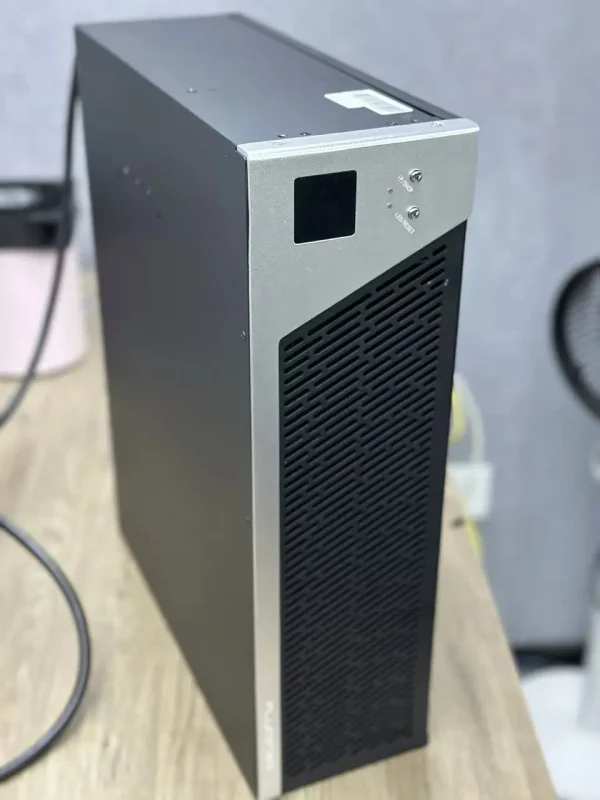
 Optimize
Users can improve mining results by joining reliable pools and checking pool settings often. He should choose pools with low fees and fast payouts. Using a wired network connection helps keep mining steady. Cleaning the fluminer every week and updating firmware also boosts efficiency. Smart choices help the l1 run better and earn more.
Tip: He should watch electricity use and try low-power modes if available. This helps save money and keeps the miner cool.
Costs
Choosing the right miner requires careful consideration of operational costs and potential profits. Below is a breakdown of key models and factors affecting earnings.
Fluminer L1: Competitive Efficiency and Returns
The Fluminer L1 (5.6GH/s) stands out with a monthly profit of $127.54, earning $4.25 per day after accounting for electricity. With an average monthly electricity cost of $69.12, it remains a cost-effective option for Dogecoin and Litecoin mining.
Fluminer L1 Pro: Consistent Mid-Range Performance
The L1 Pro model delivers a daily profit of $4.15 , adding up to $124.64 per month. It generates $6.84 per day with daily electricity costs of $2.69.
You must consider before you buy:
Profitability Fluctuation: At an electricity rate of $0.10/kWh, the Fluminer L1 can yield ~$10.83/day, but this is highly dependent on cryptocurrency market conditions.
Reliability Questions: As a newer entrant, FluMiner lacks the long-term reliability data of established brands like Bitmain.
Firmware and Support: Ongoing updates may enhance performance, but user-driven maintenance and compatibility should be expected.
*Note: Always verify your local electricity rate and pool fees to accurately assess potential profitability before investing in a miner.
*Note: Always verify your local electricity rate and pool fees to accurately assess potential profitability before investing in a miner.
Conclusion
Setting up and running your Fluminer L1 effectively requires careful attention to hardware setup, regular monitoring, and proactive maintenance. By selecting a suitable location with proper ventilation, connecting to a stable mining pool, and keeping the firmware updated, you can optimize its performance and extend its lifespan.
While the Fluminer L1 offers an efficient and user-friendly entry into home mining, always remember that profitability depends on factors like Bitcoin’s market value, network difficulty, and your local electricity rate. Stay informed, perform routine checks, and follow Yesmining for the latest updates and tips to enjoy being part of the decentralized future of Bitcoin mining.
FAQ
How often should someone clean the Fluminer L1?
He should clean the Fluminer L1 every week. Dust can block airflow and cause overheating. Regular cleaning helps the miner work better and last longer.
What should a user do if the Fluminer L1 does not connect to WiFi?
He should check the WiFi antenna and make sure it is tight. He can restart the miner and router. If problems continue, he should use Ethernet for a stable connection.
Can the Fluminer L1 run at home?
Yes, the Fluminer L1 is designed for home use. For optimal comfort and performance, it is recommended to place it in a well-ventilated area. Ensuring adequate airflow around the device will also help maintain its efficiency and longevity.









 Optimize






















 Bitmain
 Iceriver
 Bitdeer
 BOMBAX
 DragonBall
 Elphapex
 Fluminer
 Goldshell
 iBelink
 Ipollo
 Jasminer
 Volcminer
 Bitcoin(BTC) Miner
 Aleo Miner
 CKB Miner
 ETC Miner

 Kaspa(KAS) Miner


 Siacoin(SC) Miner