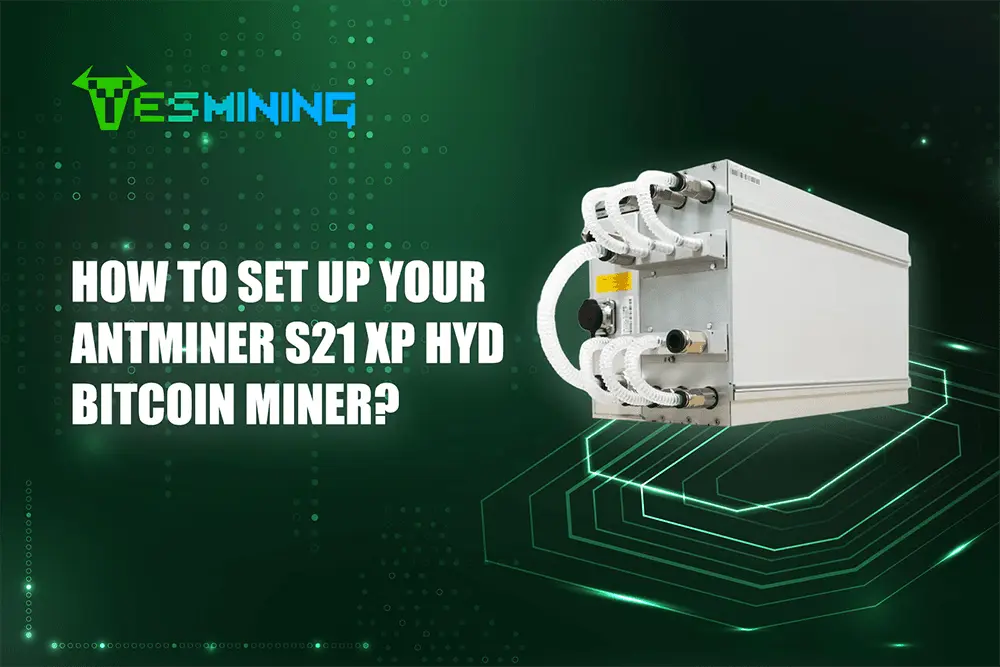
Setting up your Antminer S21 XP+ hyd demands careful attention to each step for safety, warranty, and peak performance. This crypto miner setup guide helps you avoid common mistakes, like power or network errors, as shown below:
Follow this setup guide for your Antminer S21 XP+ hyd, whether you are new to home mining or experienced in cryptocurrency mining. You will find this step-by-step setup process essential for any mining hardware or crypto mining needs.
Key Takeaways
Use the correct power supply and set up the hydro-cooling system carefully to keep your Antminer S21 XP+ Hyd safe and running efficiently.
Connect your miner to a stable network with a proper Ethernet cable and configure mining software and pools through the Bitmain interface for steady mining rewards.
Regularly monitor your miner’s performance, check coolant levels, and perform maintenance to avoid issues and keep your mining operation running smoothly.
Antminer S21 XP+ Hyd Setup Guide
Power and Cooling Requirements
Before you start the setup process for your Antminer S21 XP+ hyd, you need to prepare the right power and cooling systems. This crypto miner setup guide recommends you use the correct power supply to protect your mining hardware and ensure stable operation.
The antminer s21xp hydro uses about 5500W of power during operation. The liquid cooling system removes almost all the heat produced, so you must set up the cooling system setup carefully. Make sure the coolant flow rate stays between 8.0 and 10.0 liters per minute, and the pressure does not go over 3.5 bar. Use antifreeze or deionized water as your coolant. This step helps keep your Antminer S21 XP+ hyd running efficiently and extends its lifespan.
Network and Environment
First, you need a stable network. Connect the miner to your network using an RJ45 Ethernet cable that supports 10/100M speeds. This connection keeps your crypto mining operation stable and reliable.
Then, keep your Antminer S21 XP+ hydro in a place with good airflow. The recommended temperature range is -20°C to 70°C, and humidity should stay between 10% and 90%. These conditions help prevent overheating and condensation. Regularly monitor the environment to protect your mining hardware and keep your cryptocurrency mining efficient.
Unboxing and Inspection
When your Antminer S21 XP+ hyd arrives, start the installation process by unboxing it carefully. Check the miner and all accessories for any damage. Make sure all cables and connectors are secure. Look for anti-disassembly labels to keep your warranty valid. This crypto miner setup guide suggests you inspect the liquid cooling system for leaks or loose hoses. If you find any issues, contact support before you continue with the setup.

Installing and Configuring Mining Software
Connecting the Antminer S21 XP+ Hyd
You need to connect your Antminer S21 XP+ hyd to both power and network before you start mining. Follow these steps to ensure a safe and stable connection:
Check that your power source provides 380-415V AC in three-phase.
Use cables designed for three-phase power. Connect them securely to the miner and your power supply.
Double-check all electrical connections. Loose cables can cause hazards and reduce optimal performance.
Take an RJ45 Ethernet cable and connect your Antminer S21 XP+ hyd to your router or network switch.
Make sure the cable fits tightly. A loose network cable can interrupt your mining software and lower your hash rate.
Setting Up Hydro Cooling
The Antminer S21 XP+ hyd uses high-performance hydro-cooling to keep temperatures low and maintain optimal performance. You must set up the cooling system before you power on the miner.
Attach the coolant hoses to the inlet and outlet ports on the miner.
Make sure the connections are tight to prevent leaks.
Fill the cooling system with antifreeze or deionized water. Keep the coolant flow rate between 8.0 and 10.0 liters per minute.
Check the pressure. It should not go above 3.5 bar.
Inspect the system for leaks or air bubbles. Fix any issues before you continue.
A well-maintained hydro-cooling system protects your mining hardware and keeps your hash rate steady. Regularly check coolant levels and clean the system to ensure optimal performance.
Accessing the Bitmain Interface
You need to access the Bitmain web interface to finish installing and configuring mining software on your Antminer S21 XP+ hyd. Here is how you do it:
Make sure your miner is connected to your network with an Ethernet cable.
Find the miner’s IP address. Most networks assign this automatically using DHCP. You can check your router’s device list or use Bitmain’s IP reporter tool.
Open a web browser on your computer. Enter the miner’s IP address in the address bar.
Log in to the Bitmain interface. The default IP is usually 192.168.1.1. Use the default credentials if you have not changed them.
Once inside, review the network settings. If you notice frequent disconnections, set a static IP address for better stability.
Mining Pool Configuration
You must join a mining pool to start earning rewards with your Antminer S21 XP+ hyd. Mining pools combine the power of many miners, increasing your chances of earning Bitcoin. Follow these steps to set up your mining pool:
Choose a mining pool that fits your needs. Popular pools offer good support and stable payouts.
Create an account on the pool’s website. You will receive a worker name and pool URL.
In the Bitmain interface, go to the mining software settings. Enter the pool URL, your worker name, and your password.
This miner lets you add up to three pools. The miner will switch to the next pool if the first one goes offline.
Save your settings and restart the miner.
You should monitor your hash rate and temperature in the dashboard. Adjust your mining software settings if you see any drops in performance. Joining a mining pool helps you get steady payouts and keeps your mining operation efficient.
Firmware and Updates
Keeping your antminer up to date is important for security and optimal performance. Firmware updates can fix bugs, improve hash rate, and add new features to your mining software.
Visit the official Bitmain website to download the latest firmware for the antminer s21xp+ hydro.
In the Bitmain interface, go to the firmware update section.
Upload the new firmware file and follow the on-screen instructions.
Wait for the miner to reboot. Do not power off the device during this process.
After updating, check your mining software settings and mining pool configuration. Make sure everything works as expected. Regular updates help it run smoothly and keep your mining operation at peak efficiency.
Optimization and Troubleshooting
Monitoring, Performance and Maintenance
You want your S21 XP+ HYD to run at optimal performance every day. Start by checking the dashboard often. Watch the hash rate, chip temperatures, and pool connection status. If you see a drop in hash rate or a rise in temperature, act quickly to protect your mining hardware.
Bitmain recommends a regular maintenance schedule for the antminer s21xp hydro. Follow these steps to keep your miner reliable:
Check coolant levels every week. Use only deionized water or special antifreeze. Tap water can cause corrosion.
Flush the hydro cooling system every three months. This removes buildup and keeps the flow steady.
Keep water temperature above 20°C for safe operation.
Inspect all fittings and connections each month. Look for leaks or loose hoses.
Test the coolant pH. It should stay between 7.0 and 9.5.
Make sure coolant flow rates stay between 8.0 and 10.0 L/min. Keep pressure under 3.5 bar.
These steps help you avoid pump damage and cooling problems. They also support optimal performance for your Antminer S21 XP+ hyd.
Troubleshooting Common Issues
You may face some problems while running your S21 xp+ hyd. Troubleshooting helps you fix these quickly and keep optimal performance. Here are some common issues and solutions:
If you cannot solve a problem, contact Bitmain support. They can help with advanced troubleshooting and repairs. Always keep your firmware updated for optimal performance and security. Regular monitoring and quick troubleshooting keep your antminer s21xp hydro running smoothly.
You set up your miner by following each step, checking connections, and monitoring performance. Regular maintenance keeps your miner efficient. Bitmain offers a 365-day warranty for most parts. Always check your warranty status and contact support if needed.
Profitability Analysis and ROI Calculations
When evaluating the profitability of mining with the Antminer S21 XP+ Hyd, it’s essential to consider upfront costs, operating expenses, and potential returns—factors that vary significantly across different miner models.
Upfront Investment Breakdown
The Antminer S21 XP+ Hyd 500T, a SHA-256 algorithm miner with a maximum hashrate of 500T, comes with a base price of $12,000. A critical addition to this cost is the hydro-cooling system, which is necessary to maintain the miner’s performance and prevent overheating. Hydro-cooling equipment increases the total upfront investment by approximately 20%. This includes specialized cooling components (such as pumps, radiators, and hoses) and dielectric fluid, both of which are integral to the efficient operation of the hydro-cooling setup.
Key Variables Impacting ROI
The return on investment (ROI) for the S21 XP+ Hyd 500T depends on balancing these upfront costs with ongoing expenses and mining rewards, shaped by several key factors:
Power Consumption: With a power draw of 5,500W, electricity costs form a significant portion of ongoing expenses. Regional variations in electricity rates directly affect operational costs—lower rates reduce monthly outlays, while higher rates can extend the time needed to recoup initial investment.
Hashrate and Reward Potential: The miner’s 500T hashrate determines its contribution to SHA-256 networks (e.g., Bitcoin). Rewards are influenced by network difficulty (higher difficulty reduces individual miner shares) and Bitcoin’s market price (volatility impacts the fiat value of earned coins).
Cooling System Maintenance: Proper upkeep of the hydro-cooling setup (including monitoring coolant levels and ensuring optimal flow) is critical to preserving the 500T hashrate. Neglecting maintenance can lead to performance drops, reducing daily rewards and slowing ROI.
By accounting for the base cost of the S21 XP+ Hyd 500T, the 20% premium for hydro-cooling equipment (including special cooling gear and dielectric fluid), and variable factors like electricity costs and market conditions, miners can better assess the long-term financial feasibility of this model. Understanding these elements helps align the investment with individual budget constraints and mining goals.
If you need more infos about Antminer S21 XP+ Hydro, please click to get more help.
FAQ
How do you reset your Antminer S21 XP+ Hyd to factory settings?
You press and hold the reset button for 10 seconds. The miner will restart and restore default settings.
What coolant should you use for the hydro-cooling system?
You should use deionized water or special antifreeze. Tap water can damage your miner and reduce cooling efficiency.
How loud is the Antminer S21 XP+ Hyd?
Hydro-cooled Antminers operate near 50dB, significantly quieter than air-cooled models. Noise primarily comes from coolant pumps and power supply fans, which is normal.
Are there other recommended hydro-cooled Bitcoin miners for 2025 besides the S21 XP+ Hyd 500T?
What advantages do hydro-cooled miners like the S21 XP+ Hyd 500T offer over air-cooled alternatives?
Hydro-cooled miners typically deliver more stable performance, as they maintain consistent temperatures even under heavy loads. This stability often translates to higher uptime and a longer operational lifespan compared to air-cooled systems, making them a preferred choice for miners prioritizing long-term efficiency.

 English
  Russian
  Spanish
  French
  German



















 Avalon
 Bitdeer
 Bitmain
 BOMBAX
 DragonBall
 Elphapex
 Fluminer
 Goldshell
 iBelink
 Iceriver
 Ipollo
 Jasminer
 Volcminer
 Aleo Miner
 Bitcoin(BTC) Miner
 CKB Miner
 Dash Miner
 Doge<C Miner
 ETC Miner
 Grin Miner
 Handshake(HNS) Miner
 Initverse(INI) Miner
 Kadena(KDA) Miner
 Kaspa(KAS) Miner
 LBRY (LBC) Miner
 Monero(XMR) Miner
 Nexa Miner
 Ravencoin(RXD) Miners
 ScPrime(SCP) Miner
 Siacoin(SC) Miner