





Blog
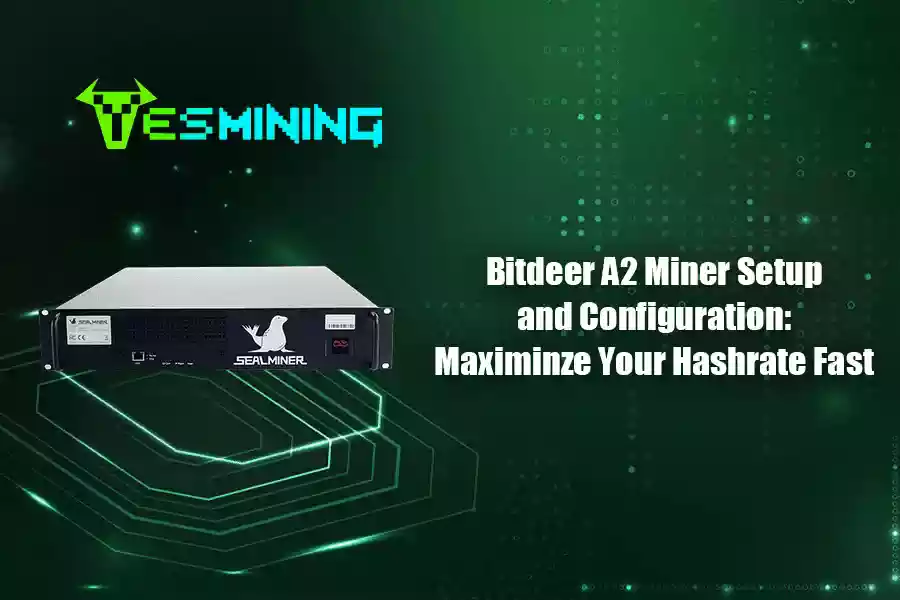
The Bitdeer SealMiner A2 Pro Hydro is a high-performance Bitcoin ASIC miner with 500TH/s and advanced hydro cooling. Its compact 2U design and energy efficiency make it ideal for beginners and large-scale operations, offering fast setup and stable, profitable mining.
First-time users may face common setup challenges, such as confusing wiring steps, unclear configuration menus, or uncertainty about how to sync with mining pools. This guide breaks down the essential steps for quick and efficient operation.
Quick Start Guide for A2 Pro Hydro
Essential Steps
Ready to get your mining journey started? You can set up your Bitdeer Sealminer A2 Pro Hydro in just a few simple steps. Most first-time users finish the initial setup in about 20 to 30 minutes. After 5–7 minutes ramp-up and 10–15 minutes tuning, your miner is ready to start mining efficiently.
Here’s what you need to do:
- Unbox your miner and check all parts.
- Place the miner in a safe spot near your water-cooled rack.
- Connect the hydro cooling lines. Make sure there are no leaks.
- Plug in the power cable and connect the Ethernet cable.
- Turn on the miner and wait for the status lights.
- Open your web browser and access the miner dashboard.
Tip: Always use distilled water with a corrosion inhibitor in your cooling system. This keeps your mining hardware safe and running smoothly.
Key Settings to Start Mining
Once you finish the basic mining setup, you need to adjust a few key settings. These settings help you get the best hashrate and keep your miner stable. You want to make sure your miner is ready for bitcoin mining and can handle long hours of work.
- Mining Pool: Enter your mining pool address and worker name. This connects your miner to the bitcoin network.
- Operation Mode: Choose the mode that fits your needs. You can pick high-performance mode for maximum bitcoin mining power or balanced mode for better energy use.
- Hashrate Settings: Set your target hashrate. Watch the dashboard to see if your miner reaches this number.
- Temperature Limits: Set safe temperature limits. This protects your miner from overheating.
If you follow these steps, you will have a strong mining setup. You can start earning bitcoin and enjoy smooth mining every day.
Sealminer A2 Pro Hydro Overview
Main Features
You want a miner that works hard and stays cool. The sealminer a2 pro hydro gives you both. This asic miner uses advanced hydro cooling to keep your mining hardware running at top speed. You do not have to worry about overheating. The system uses distilled water and a corrosion inhibitor to protect your gear. You get a strong and steady hashrate, even during long bitcoin mining sessions.
Here’s a quick look at the key specs:
| Miner Model | Power Efficiency | Hashrate | Power Consumption |
|---|---|---|---|
| SEALMINER A2 Pro Hyd | 14.9J/TH ±5% | 500TH/s to 530TH/s | 7,450W to 7,900W |
You get a power efficiency ratio of 14.9 J/TH. The hashrate ranges from 500TH/s to 530TH/s. Power use stays between 7,450W and 7,900W. This makes the sealminer a2 pro hydro one of the most powerful asic miners for bitcoin mining. You can count on it for big mining operations or even if you just want the best mining hardware at home.
Tip: The 2U form factor fits right into standard water-cooled racks. You can scale up your mining setup with ease.
Operation Modes
You can pick the operation mode that fits your mining goals. The sealminer a2 pro hydro lets you switch between high-performance and balanced modes. High-performance mode gives you the most hashrate. Balanced mode helps you save energy while still getting great results. You control how your asic works, so you can match your mining hardware to your needs.
- High-Performance Mode: Pushes your asic miners to the max for top bitcoin rewards.
- Balanced Mode: Keeps your mining efficient and steady, using less power.
You can change modes anytime from the dashboard. This makes it easy to adjust your mining plan as bitcoin prices or power costs change. The sealminer a2 pro hydro gives you the flexibility you need to stay ahead in mining.
Hardware Setup
Unboxing
Open the box and check every part. You will see the asic miner, power cables, hydro cooling lines, and mounting brackets. Make sure nothing is missing or damaged. If you spot any problems, contact support before you start your setup. Place the asic miners on a clean, flat surface. This keeps your hardware safe and ready for the next steps.
If there are missing accessories, damaged hardware, or other problems, stop all subsequent operations right away. Contact Bitdeer customer support (or the support team of your purchase channel), provide evidence such as photos for feedback, and only proceed with setup after the issues are resolved.
Hydro Cooling Connections
Your asic miners need the right environment to work well. Here’s a quick look at the best conditions:
| Parameter | Range |
|---|---|
| Temperature | 5 – 40 °C |
| Humidity | 10 – 90 % |
Keep your mining hardware within these limits. Make sure the coolant flow rate is at least 10.2 L/min. This helps your asic miners stay cool and perform at their best.
Network & Power
Ethernet Connection
You want your miner to stay connected and work without interruptions. The Sealminer A2 Pro Hydro needs a wired Ethernet connection. Wi-Fi does not work with this miner. Plug one end of your Ethernet cable into the miner and the other end into your router or switch. Make sure the cable clicks in place. A loose cable can cause your miner to lose connection.
A stable internet connection helps your miner send and receive data fast. This keeps your hashrate steady and avoids missed rewards. You should use a dedicated, wired network for your mining setup. Avoid sharing the same line with other heavy internet users.
Here’s a quick table to help you check your network setup:
| Requirement | Details |
|---|---|
| Power Supply | Dedicated 30A, 220V–240V circuit |
| Connection Type | Ethernet only (no Wi-Fi support) |
| Internet Stability Requirement | Stable, wired internet connection required for proper mining |
Tip: Use a high-quality Ethernet cable. This helps prevent drops in connection and keeps your miner running smoothly.
Powering Up
Now you are ready to power up your miner. The Sealminer A2 Pro Hydro uses a lot of energy, so you need a strong power source. Plug the power cable into a dedicated 30A, 220V–240V circuit. Do not use extension cords or power strips. These can overheat and cause problems.
Check that your cooling system is running before you turn on the miner. The coolant should flow without leaks. Press the power button and watch the status lights. The miner will start up and run a quick check. You will hear the fans and pumps working.
The table below shows how much power your miner uses in different modes:
| Mode | Hashrate | Power Consumption |
|---|---|---|
| Normal Mode | 500 TH/s | 7450W (7.45 kW) |
| Overclocked | 605 TH/s | 9680W (9.68 kW) |
If you want to mine at higher speeds, your power supply must handle the extra load. Always double-check your setup before you leave the miner running.
Safety Reminder: Never touch the miner or cables with wet hands. Always check for any signs of overheating or unusual sounds. Stay safe and keep your mining operation running strong!
Miner Configuration
Accessing Dashboard
You want to control your miner and see how your mining rig is working. The dashboard makes this easy. You can check your hash rate, change settings, and watch your bitcoin mining progress. Here’s how you get started:
- Plug your miner into your network. The default IP mode uses DHCP, so your router gives it an address.
- Use the Sealminer Tool to scan for your miner’s IP. Hold the ‘IP Report’ button for 5 seconds.
- Open your web browser. Type in the IP address you found.
- Log in with username
sealand passwordseal. - You see the dashboard. Now you can enter your mining pool URL and worker name.
- If you want a static IP, go to Network > Settings. You can set it up there.
- Any changes you make take effect right away. You don’t need to reboot your rig.
Tip: Bookmark your dashboard page. You’ll check it often to monitor your hash rate and mining stats.
Firmware Updates
Keeping your miner’s firmware up to date helps you boost hashrate and keep your hardware safe. New firmware can fix bugs, improve mining performance, and add new features. You should check for updates every month.
- Go to the dashboard and look for the firmware section.
- Download the latest firmware from Bitdeer’s official site.
- Upload the file in the dashboard and start the update.
- Wait for the rig to finish. Don’t turn off your miner during the update.
Note: Firmware updates happen fast. Your miner will restart itself when finished. You’ll see your hash rate return to normal after a few minutes.
Mining Pool Setup
You need to connect your miner to a mining pool to start earning bitcoin. The pool collects work from many miners and shares rewards. Setting up your mining pool is simple.
- In the dashboard, find the mining pool settings.
- Enter the pool URL. Add your worker name. This helps you track your mining rewards.
- Save your changes. Your miner starts sending work to the pool right away.
You can switch pools anytime. Just change the URL and worker name. Your rig will update instantly. You’ll see your hash rate and mining stats change on the dashboard.
Tip: Pick a reliable mining pool with low fees and good payout history. This helps you get steady bitcoin rewards.
Hashrate Settings
You want to get the best hash rate from your mining hardware. The Sealminer A2 Pro Hydro lets you pick different modes for your miners. Each mode changes your hash rate, power use, and energy cost. You can tune your rig for high performance or better efficiency.
Here’s a table to help you choose:
| Mode | Avg. Hashrate (TH/s) | Efficiency (J/TH) | Power (kW) | Daily Electricity Cost ($) |
|---|---|---|---|---|
| LPM | 470 | 14.5 | 6.82 | 9.83 |
| NPM | 515 | 14.9 | 7.67 | 11.06 |
| HPM | 605 | 16.0 | 9.68 | 13.95 |
- LPM (Low Power Mode) saves energy. Your hash rate is lower, but you spend less on electricity.
- NPM (Normal Power Mode) gives you balanced mining. You get a strong hash rate and good efficiency.
- HPM (High Performance Mode) pushes your miners to the max. You get the highest hash rate for bitcoin mining, but your rig uses more power.
You can change modes in the dashboard. Watch your hash rate and mining stats. If you want to boost hashrate, try HPM. If you want to save money, use LPM. Your hardware will adjust right away.
Callout: Always check your miner’s temperature when tuning hash rate settings. Good cooling keeps your mining hardware safe and helps you mine bitcoin longer.
You now have full control over your mining rig. You can adjust hash rate, update firmware, and connect to the best mining pools. This helps you get the most out of your miners and earn more bitcoin every day.
Performance Tuning
Operation Modes Adjustment
You want your miner to do its best job. First, pick the right operation mode. The Sealminer A2 Pro Hydro lets you change modes for different needs. High-performance mode gives you the most power. Balanced mode helps you use less energy. Low power mode keeps things cool and quiet. You can change these settings in the dashboard with a few clicks.
Here are some ways to tune your miner’s performance:
- Change the clock speed for more or less power.
- Try different cooling methods like hydro or immersion oil.
- Use a high-efficiency power supply to save electricity.
Tip: Always check your miner’s temperature after changing modes. Good cooling keeps your hardware safe.
Overclocking & Underclocking
Overclocking can make your miner work faster. You get more hashrate and bigger rewards. Overclocking means raising the chip speed above normal. This makes your miner work harder and faster. But it also uses more power and makes more heat. You need strong cooling to keep things safe.
Underclocking does the opposite. You lower the chip speed to use less power. This helps your miner run cooler and last longer. Lowering the chip’s frequency is smart if you want to save electricity or keep your hardware healthy.
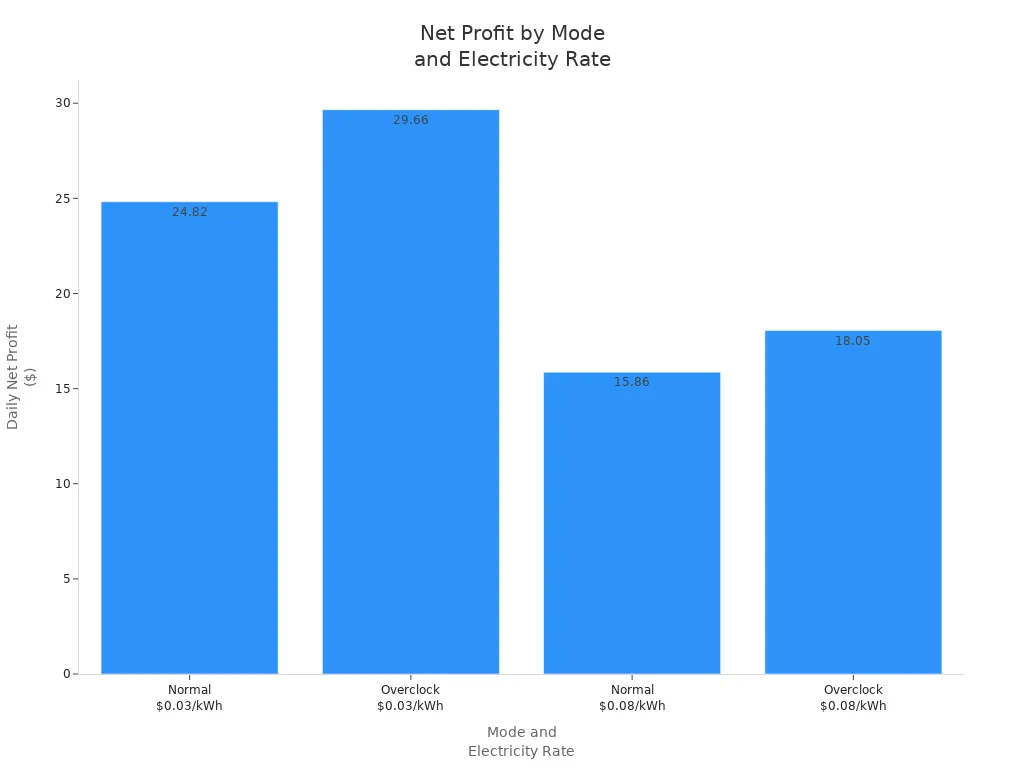
Let’s see how overclocking and underclocking change your results:
| Mode | Hashrate | Power | Electricity rate | Daily power cost | Daily BTC output | Daily revenue | Daily net profit |
|---|---|---|---|---|---|---|---|
| Normal | 500T | 7450W | $0.03 | $5.38 | 0.0002517 | $30.20 | $24.82 |
| Overclock | 605T | 9680W | $0.03 | $6.97 | 0.0003053 | $36.63 | $29.66 |
| Normal | 500T | 7450W | $0.08 | $14.34 | 0.0002517 | $30.20 | $15.86 |
| Overclock | 605T | 9680W | $0.08 | $18.58 | 0.0003053 | $36.63 | $18.05 |
Remember these things when overclocking your miner:
- Overclocking can make your miner too hot and stop working.
- Overclocking uses more power and can stress your circuits.
- Using third-party firmware for overclocking may cause errors or damage.
- Overclocking and underclocking both change how long your chips last.
You can use underclocking to save money and help your miner last longer. Overclocking gives you more speed, but you must watch for heat and power problems.
Monitoring Performance
You need to watch your miner’s performance all the time. The Sealminer dashboard shows real-time stats like hashrate and temperature. You can find problems fast and fix them before they get worse.
Here’s what the monitoring tools give you:
| Feature | Description |
|---|---|
| Real-time monitoring | Tracks miners and key stats, like illegal miners and zero hashrate. |
| Alert notifications | Sends alerts right away if something goes wrong. |
| Suspicious behavior detection | Spots strange activity and helps you solve issues quickly. |
Stay alert! Good monitoring helps you catch problems early and keep your mining running strong.
Maintenance & Monitoring
Regular Checks
Keeping your Sealminer A2 Pro Hydro in top shape is easy when you follow a simple routine. You want your miner to run smoothly and avoid any surprises. Here are some things you should check every day:
- Wipe down your mining rig to keep dust away. Dust can block airflow and cause overheating.
- Look at your cooling system. Make sure water flows well and there are no leaks. If your miner gets too hot, think about upgrading your cooling setup.
- Watch the temperature and humidity in your mining room. Try to keep the temperature between 10°C and 25°C. This helps your miner work at its best.
- Check your internet connection. A stable network keeps your miner online and earning.
- Use software tools to track your rig’s performance. If you spot a problem early, you can fix it before it gets worse.
Tip: A quick daily check can save you from bigger problems later. Your miner will thank you with steady performance and fewer breakdowns.
Using Sealminer Tool
The Sealminer Tool makes it simple to manage your mining rigs. You can use it to check on your miners, update firmware, and change settings without any hassle. Here’s how you can use the tool:
- Open the Sealminer Tool on your computer.
- Scan your network to find all connected miners.
- View real-time stats like hashrate, temperature, and uptime.
- Update firmware for one or many miners at once.
- Change settings or restart miners with just a few clicks.
You can spot issues fast and keep your mining operation running strong. The Sealminer Tool helps you stay on top of your rigs and maintain high performance every day. If you want to grow your mining farm, this tool makes it easy to manage everything in one place.
Troubleshooting
Network Issues
Network problems can slow down your bitcoin mining. You want your miner to stay connected for the best hashrate. Sometimes, you might see your hash rate drop or your mining stop. Here are some common network issues and how you can fix them:
| Network Issue | Solution |
|---|---|
| Temporary disconnections | Maintain a wired connection to reduce latency and avoid wireless issues. |
| Extended network downtime (over 15 min) | Power off the miners to prevent energy waste and hardware damage due to humidity. |
| Intentional network disconnection | Always power off the miners before disconnecting the network to avoid sudden disruptions. |
| ISP outages or DDoS attacks | Ensure continuous communication with the Bitcoin network to minimize impact. |
| Reconnection attempts | If multiple reconnection attempts fail, the miner will disconnect to prevent damage. |
You should always use a wired Ethernet cable. Wi-Fi can cause your hash rate to drop. If your internet goes down for a long time, turn off your miner. This keeps your mining hardware safe.
Hashrate Drops
A sudden drop in hashrate can hurt your bitcoin mining rewards. You want to keep your hash rate steady for the best results. First, check your network. A weak connection can lower your hashrate. Next, look at your cooling system. If your miner gets too hot, it will slow down to protect itself. Overclocking can also cause your hash rate to fall if your miner cannot handle the extra speed. Try underclocking if you see problems. This can help your miner run cooler and more stable. Watch your dashboard for any changes in hash rate. Quick action keeps your mining strong.
Cooling Problems
Good cooling is key for high hashrate and safe bitcoin mining. If your miner gets too hot, your hash rate will drop. Overclocking makes your miner hotter, so you need strong cooling. Always check your coolant flow and temperature. Use only distilled water with a corrosion inhibitor. If you see leaks or low flow, fix them right away. Underclocking can help if your room is too warm. This lowers heat and keeps your mining hardware safe. Never ignore high temperatures. Your miner will last longer with good cooling.
Resetting Miner
Sometimes, you need to reset your miner to fix problems. If your hash rate drops or your miner freezes, a reset can help. First, turn off your miner. Wait a few seconds. Turn it back on. If you still see issues, use the dashboard to reset settings. Overclocking or underclocking changes can sometimes cause errors. A reset puts your miner back to normal. You can then start bitcoin mining again with a steady hash rate. Always check your settings after a reset. Make sure your mining pool, overclocking, and underclocking options are correct.
Best Practices
Safety Tips
You want your mining setup to run safely every day. Start by checking your hardware before you power up. Make sure all cables connect tightly. Never touch your miners or hardware with wet hands. Water and electricity do not mix. If you see any leaks in your cooling system, turn off your miners right away. Fix leaks before you start mining again.
Keep your mining room clean. Dust can build up on your hardware and cause it to overheat. Wipe down your miners often. Use a surge protector to protect your hardware from power spikes. If you hear strange sounds or see warning lights, check your miners fast. Quick action keeps your bitcoin mining safe and helps you avoid extra costs.
A few minutes of checking can save you from big repair bills and lost profit.
Sustained Mining Performance
You want steady returns and higher profits from your bitcoin mining. Good habits help you reach your goals. Check your dashboard every day. Watch your daily net profit and look for changes. If your returns drop, check your hardware and cooling system. Fast fixes keep your miners working hard.
Update your firmware when Bitdeer releases new versions. New firmware can boost your daily net profit and improve stability. Use the Sealminer Tool to manage updates for all your miners at once. This saves time and helps your hardware last longer.
Here are some best practices for long-term profitability:
| Task | How Often | Why It Matters |
|---|---|---|
| Clean hardware | Weekly | Prevents overheating |
| Update firmware | Monthly | Boosts returns |
| Check costs | Daily | Maximizes profit |
| Monitor miners | Daily | Ensures stability |
Stay active in the community. You can learn how to boost your profitability and get more out of your hardware. Smart miners always look for ways to improve returns and cut costs.
You want the best profit from your Sealminer A2 Pro Hydro. Start with a solid setup and keep your cooling system in top shape. Regular checks help you avoid high costs and boost your profit. Watch your dashboard daily to track returns and spot issues fast. Safe operation means fewer problems and more profit over time. Use this guide to fix drops in returns and keep costs low. For more tips on profit and better returns, check out these Bitdeer resources:
- Bitdeer’s Guide For Solo Mining In 2025
- The Best Way to Mine Crypto on Your Phone
- Crypto Mining Container – Ultimate Guide
Stay informed and you will see your profit and returns grow while keeping costs under control.
FAQ
How often should you change the coolant in your Sealminer A2 Pro Hydro?
You should check your coolant every month. If it looks dirty or low, change it right away. Clean coolant keeps your miner safe and cool. Always use distilled water with a corrosion inhibitor.
What should you do if your miner overheats?
First, check your cooling system. Make sure water flows well and there are no leaks. Lower the operation mode if needed. If the problem continues, turn off your miner and let it cool down before restarting.
What is the best way to monitor your miner’s performance?
Use the Sealminer dashboard or Sealminer Tool. You can see real-time stats like hashrate and temperature. Set up alerts for any problems. This helps you fix issues fast and keep your miner running strong.
























 Bitmain
 Iceriver
 Bitdeer
 BOMBAX
 DragonBall
 Elphapex
 Fluminer
 Goldshell
 iBelink
 Ipollo
 Jasminer
 Volcminer
 Bitcoin(BTC) Miner
 Aleo Miner
 CKB Miner
 ETC Miner

 Kaspa(KAS) Miner


 Siacoin(SC) Miner