
 English
  Russian
  Spanish
  French
  German
Blog

Setting up your Goldshell E-AE1M, AE Max, or AE Max II miner can be a challenge for many Aleo mining beginners. This comprehensive guide walks you through the entire process—from unboxing and parts inspection to network configuration, firmware updates, and mining pool setup—all tailored to streamline your Aleo mining journey.
Whether you’re new to Aleo mining and need clear foundational steps or an experienced operator looking to scale your setup efficiently, these step-by-step instructions will help you get your Goldshell ASIC miner operational fast, avoid common pitfalls, and lay a solid groundwork for stable Aleo mining performance in 2025.
Key Takeaways
Pick the miner that fits what you need. The AE Max II works fastest and uses less power. The E-AE1M makes less noise and is good for homes.
When you open the box, look at everything inside. Make sure you have all the parts. Check if anything looks broken before you start.
Read each setup step and do them in order. Use a wired Ethernet cable for a better connection. Set a fixed IP address so your network works well.
Update the miner’s firmware often to keep it safe. Look for updates every month to help it run well.
Watch how your miner works every day. Check the hashrate, temperature, and fan speed. This helps you find problems early.
Goldshell E-AE1M vs. AE Max vs. AE Max II: Which Aleo Miner Is Right for You? (2025 Comparison)
Key Specs Comparison Table
You need to know what each miner does best. Goldshell E-AE1M, AE Max, and AE Max II are not the same. They have different power, speed, and noise. The table below lets you see their main features together.
Miner Model | Hashrate | Power Consumption | Efficiency | Noise Level |
|---|---|---|---|---|
230 MH/s | 2000W | 8.7 J/MH | 45 dB | |
360 MH/s | 3300W | 9.17 J/MH | 70 dB | |
540 MH/s | 3200W | 5.93 J/MH | 75 dB |
Tip: AE Max II is the fastest and most efficient. It uses less energy for each job than the others.
The chart below makes it easy to compare hashrate and power use.
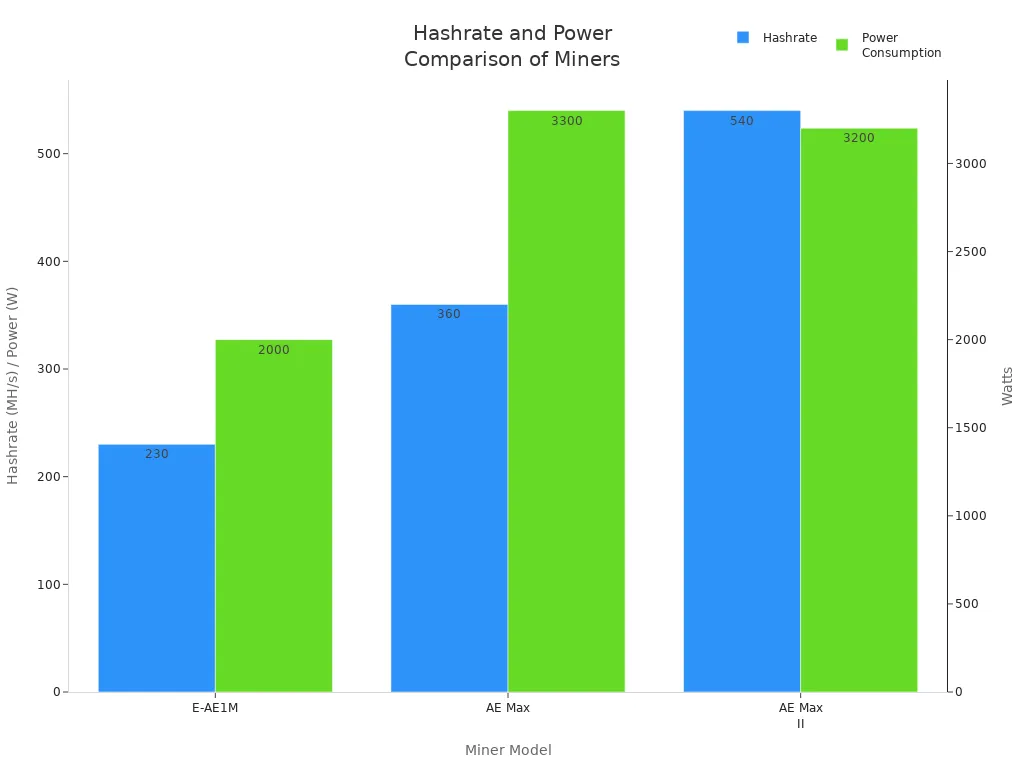
Goldshell E-AE1M is very quiet. It makes only 45 dB of noise. This is good for homes. AE Max and AE Max II are louder. They are better for places made for mining.
How happy users are is also important. Many people like that it works well and is simple to use.
Unboxing Guide: Check Parts & Warranty
Step 1: Check Box Contents
When you get a new Goldshell miner, open the box slowly. Inside, you should find the miner, a power supply unit (PSU), and a user manual. Some miners, like the Goldshell AE Max, have the PSU in the box. Make sure all the items are there by using the packing list. If something is missing, it can slow down your setup.
Tip: Save the box and packing. You will need them if you want to return the miner or use the warranty.
Before starting setup, it’s important to note that all Goldshell Aleo miners (E-AE1M, AE Max, AE Max II) come with an official 6-month warranty from Goldshell. This warranty covers manufacturing defects and hardware malfunctions; if issues occur within the 6 months, you can access support directly through Goldshell or your authorized seller.
Goldshell offers direct sales as the brand owner, but if you’re looking to get genuine hardware with extra value and support, authorized distributor Yesmining is worth considering. It guarantees 100% authentic Goldshell miners (so you won’t face counterfeit risks that void warranties), often has more favorable pricing than direct purchases, and provides tailored after-sales help—from pre-purchase guidance to smooth coordination for Goldshell’s 6-month warranty. For a hassle-free way to get your mining setup started right, it’s a reliable option.
Inspect Miner
After you check the box, look at the miner for damage. See if there are dents, cracks, or loose parts. If you find any damage, tell the seller right away. A broken miner might not work or could stop working soon.
You should also look at the label and details on the miner. Make sure they match what you ordered. For example, the E-AE1M is quiet, but the AE Max II is faster and uses less energy. Checking these things helps you avoid mistakes before you set up your miner.
Step-by-Step Setup Instructions
Setting up Goldshell E-AE1M, AE Max, and AE Max II Aleo miners is simple. The process suits beginners and does not require advanced skills. Each step in this guide helps users avoid mistakes and get the miner running quickly. Video tutorials are available for those who prefer visual learning.
Power Connection
Place the miner in a cool, dry, and well-ventilated area. This prevents overheating and keeps the device safe.
Connect the power supply unit (PSU) to the miner. Make sure the connection is secure.
Plug the PSU into a dedicated electrical circuit. North American users need at least a 20A circuit with 220V. European users need a 16A circuit with 230V.
Turn on the miner using the power switch. The device will start and show indicator lights.
Tip: Use a circuit that does not share power with other heavy devices. This reduces the risk of overload and keeps the miner stable.
Network Setup
Use a wired Ethernet connection for the best stability. Wi-Fi works, but Ethernet is more reliable.
Connect the Ethernet cable from the miner to the router.
Log into the router and find the miner’s IP address. Look for the MAC address listed on the miner label.
Assign a fixed IP address to the miner in the router settings. This prevents network conflicts.
Make sure the router allows mining pool ports. Change the default router password to improve security.
Note: Place the miner away from water and dust. Good airflow helps the miner work better.
Access Dashboard
Open a web browser on a computer connected to the same network.
Enter the miner’s IP address in the browser’s address bar. For example, type http://192.168.1.100.
Log in using the default credentials: admin/admin. Change the password after the first login for safety.
If the dashboard does not load, check the router’s connected devices list. Use tools like Advanced IP Scanner or Angry IP Scanner to find the IP address.
If the miner cannot be found, use the “Find My Goldshell” feature online or reset the miner to factory settings. This will help the device get a new IP address.
This guide makes it easy for users to access the dashboard and start configuring their miner. Each step is clear and helps users avoid common problems.
Goldshell Aleo Miner Mining Guide
Mining with Goldshell E-AE1M, AE Max, and AE Max II needs careful steps. This guide helps users get good results. AE Max II is great for saving energy and making money.
1, Firmware Update
Updating firmware keeps the miner safe and working well. Goldshell suggests these steps:
Get the newest firmware from the Goldshell website.
Go to the miner dashboard and click System > Firmware Upgrade.
Add the new firmware file and start the update.
Updating firmware stops bugs and helps mining work better. Users should look for updates often.
2, Pool Configuration
Mining pools help users work together and earn rewards. F2Pool and Whalepool are good choices for Goldshell miners. Many people like these pools because they pay well and are easy to use.
To set up a mining pool, do these steps:
Make a mining pool account. Pick F2Pool or Whalepool and connect your Aleo wallet.
Put pool settings in the dashboard. For F2Pool, use
aleo.f2pool.com:4430as the URL,username.worker1for worker name, andxfor password. Add a backup pool and check how payouts work.Save your settings and restart the miner. Look at the dashboard to see if the pool is connected. Go to the pool website to check your earnings.
For Whalepool, use
stratum+tcp://alph.woolypooly.com:3106for the URL,YourWalletAddress.WorkerNamefor worker, andxfor password.
Always check the pool connection before mining. Using more than one pool can help you earn more and keep mining running.
3, Start Mining
After you set up the pool, the miner starts working. The dashboard shows speed and connection. AE Max II is fast and uses less power, so it is good for making more money.
Miner Model | Hashrate | Power Consumption | Daily Revenue | Net Profit |
|---|---|---|---|---|
Goldshell AE MAX | 360 MH/s | 3,300W | $12 to $18 | $6 to $12 |
Goldshell E-AE1M | 230 MH/s | 2,000W | Approx. $7.13 | $2.3 to $5.2 |
AE Max II is even better for saving energy and earning money than other models.
Sometimes problems happen when mining. The table below shows common problems and ways to fix them:
Problem | Solutions |
|---|---|
Power supply issues | Check if wires are loose. Make sure the outlet works and the miner has the right power supply. Use a steady power source and restart the miner. |
Hashrate problems | Restart the miner. Try a new power cable and check the wires. Look for a slow network. Change mining pools if needed. |
Unstable network connectivity | Make sure all wires are tight. Match the miner’s IP with the PC’s network. Plug straight into the router if using mesh WiFi. |
Goldshell mining is not showing up | Make sure the miner is on the right Ethernet port. Check switch settings. Do not use mesh WiFi. Use Angry IP Scanner to find the miner’s IP if the website does not work. |
This guide helps users fix mistakes and problems fast. Checking your miner often helps it work its best.
Optimize Your Miner for Best Results
Checking your miner often helps it work well. You should look at the dashboard to see the hashrate, temperature, and fan speed. If you find problems early, you can fix them fast. Watch these numbers closely for the first two days.
Goldshell E-AE1M makes good money each day. It gives $39.92 net income daily, which is 95% of what it earns. This miner is good for people who want steady money and low power use. AE Max is faster but uses more electricity, so it may not be best for people with small power budgets. Picking the right miner helps you get more money and use less power.
To keep your miner working well, follow these tips:
Learn how to use the dashboard to check how your miner works.
Get the newest firmware and install it for better performance.
Set a fixed IP address and make sure your router lets mining pool ports work.
Check your earnings and power costs often to make sure you make money.
Fixing problems quickly helps your miner keep running. The table below gives some tips:
Tip | Description |
|---|---|
Check these for the first 24–48 hours to find problems early. | |
Check power and network | If the hashrate drops or fans stop, look at the power and network; restart or reset if needed. |
Compare earnings and power cost | Look at these numbers often to keep profits steady. |
If you follow this guide and check your miner often, you can get steady results and more money. Taking care of your miner and fixing problems fast helps you mine without trouble.
Common Goldshell Miner Setup Mistakes & How to Avoid Them
Mistake 1: Skipping Firmware Updates
Mistake 2: Using the Wrong Power Supply
Mistake 3: Weak Network Connections
Mistake 4: Incorrect Pool Settings
Mistake 5: Poor Miner Placement
Conclusion
Setting up Goldshell E-AE1M, AE Max, and AE Max II Aleo miners in 2025 is straightforward, even for beginners, if you follow a structured approach. Success relies on three core steps. First, choose the right miner for your needs: pick E-AE1M for quiet home mining and AE Max II for high-efficiency farm setups. Second, prioritize basic preparations such as inspecting unboxed parts, using a dedicated power circuit, and ensuring Ethernet connectivity to avoid unnecessary delays. Third, maintain post-setup care, including monthly firmware updates and daily checks of hashrate and temperature.
These miners aim to maximize Aleo mining ROI, but their performance depends on avoiding common mistakes. Skipping firmware updates, using mismatched power supplies, or compromising network stability can all reduce profits. Pair your miner with trusted pools like F2Pool or Whalepool and follow optimization tips such as setting a fixed IP address and cleaning dust regularly. This will ensure consistent and reliable operation.
Whether you are new to Aleo mining or expanding an existing setup, Goldshell’s E-AE1M, AE Max, and AE Max II balance ease of use and performance. This guide gives you all the tools to start your miner quickly, fix issues proactively, and unlock the full profit potential of Aleo mining in 2025.
FAQ
How often should users update the miner’s firmware?
Goldshell says to check for updates every month. New firmware makes the miner safer and faster. Users should go to the Goldshell website to get the newest version.
What should users do if the miner does not appear on the network?
Users can use Angry IP Scanner to look for the miner. They should check all cables and restart the miner. Setting a fixed IP address can stop connection problems.
Can users mine with Wi-Fi instead of Ethernet?
Ethernet gives a strong and steady connection. Wi-Fi can be slow or stop working sometimes. Goldshell says Ethernet is best for mining. If you must use Wi-Fi, put the router close to the miner.
What is the best way to monitor miner performance?
Users should look at the dashboard every day. Important things to watch are hashrate, temperature, and fan speed.

















 Avalon
 Bitdeer
 Bitmain
 BOMBAX
 DragonBall
 Elphapex
 Fluminer
 Goldshell
 iBelink
 Iceriver
 Ipollo
 Jasminer
 Volcminer
 Aleo Miner
 Bitcoin(BTC) Miner
 CKB Miner
 Dash Miner
 Doge<C Miner
 ETC Miner
 Grin Miner
 Handshake(HNS) Miner
 Initverse(INI) Miner
 Kadena(KDA) Miner
 Kaspa(KAS) Miner
 LBRY (LBC) Miner
 Monero(XMR) Miner
 Nexa Miner
 Ravencoin(RXD) Miners
 ScPrime(SCP) Miner
 Siacoin(SC) Miner